Silent Hill Townfall VHF Transceivers and Calibration
Every VHF Transceiver in Silent Hill Townfall turns one more CRTV broadcast into a stored signal, and there are nine of them across six maps. Calibrate all nine and you’ve covered nearly half of the 19 signals Sweeping Signals asks for, with the other ten coming from the handheld alone. The complete SWDP (Different) map for Silent Hill Townfall has three, the most of any map, all in the game’s final stretch.
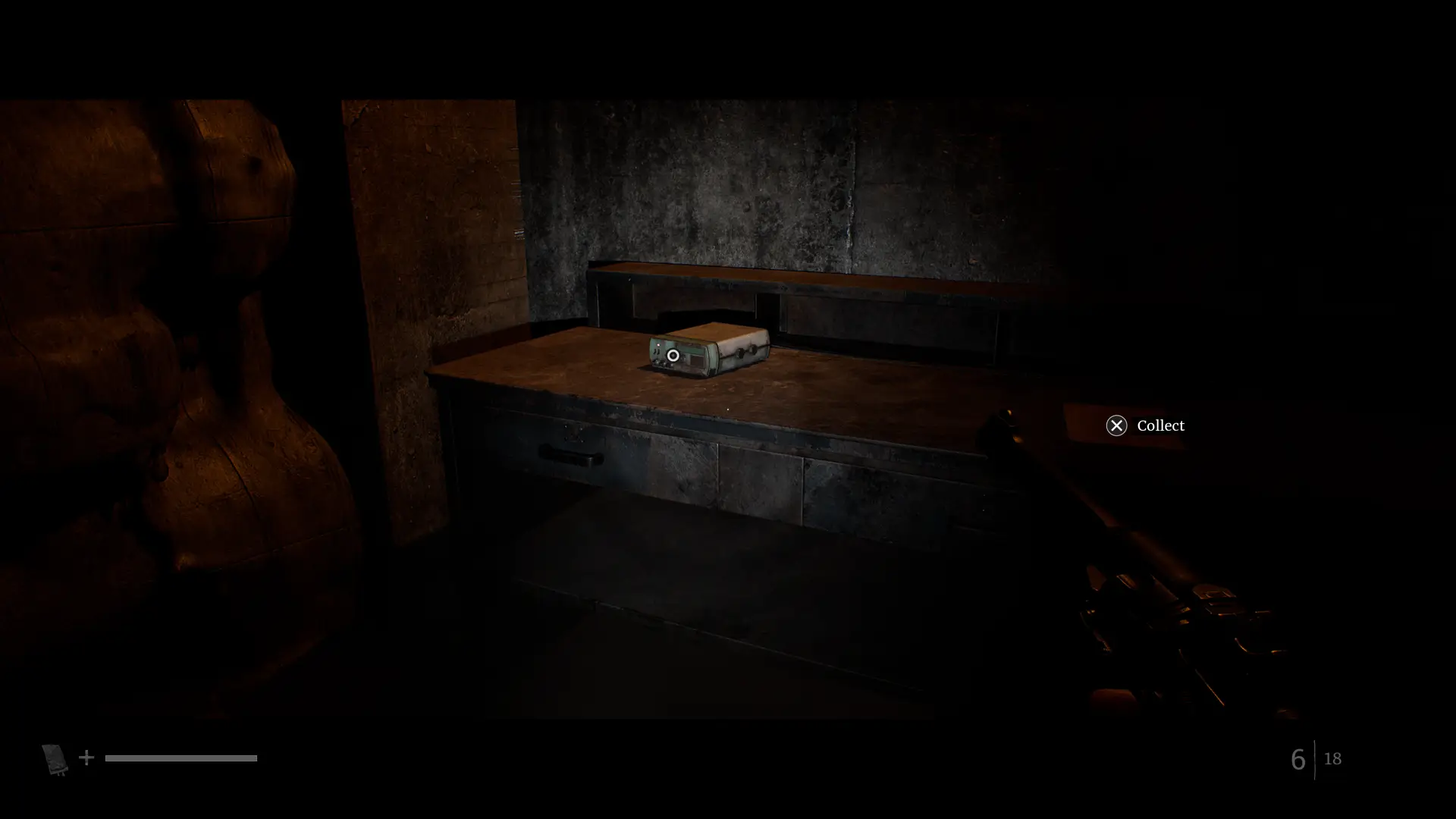
This page lists the sets in the order Alexandru Popescu reached them on PS5 for Map Master, and the Silent Hill Townfall wiki, maps, and guides cover the signals you tune in without one. Each set is a one-time job, since one successful calibration stores its channel for good.
How to Calibrate a Silent Hill Townfall VHF Transceiver: Frequency, Tilt, Colours, Store
Tune the CRTV to the set’s base frequency until the screen reads CALIBRATION REQUIRED. Then tilt the CRTV until the image stops drifting, use the D-Pad to fit the red, green, and blue bands into their boxes, and keep the store button pressed until the signal saves. The steps are the same at all nine sets.
Turn off Enable CRTV Motion Sensor controls if the picture keeps sliding. On PS5, the tilt stage uses the controller’s motion sensor by default, and that option in the control settings moves it to the right stick, which is far easier to keep steady. The CRTV Signal channel list shows which broadcast each set stores.
Silent Hill Townfall VHF Transceivers in Story Order, From the Pharmacy to Clara Woods
Simon’s first set is on the desk in the Pharmacy’s back room, which the Shorefront District South street map for Silent Hill Townfall puts in the same room as the Pharmacy phone. The second is on a table in a second-floor room of the apartment building that the Shorefront District North area map for Silent Hill Townfall covers, usable during Simon’s Otherworld section.
The Medical Centre (Different) set comes next, on a workbench just past the Squeeze Through Spot in the starting area, as the full Medical Centre (Different) map for Silent Hill Townfall shows. Clara Woods has two, one beside some clothes on a shop table and one next to the TV in the 5 South Brae living room, and the Clara Woods Estate street map for Silent Hill Townfall shows the route to the shop.
The Final VHF Transceivers in Silent Hill Townfall: CEG HQ and Three in SWDP (Different)
CEG HQ’s set is on the large desk in the ground-floor Security Room, right next to the phone. The detailed CEG HQ map for Silent Hill Townfall shows the room, where you can save, calibrate, and reload in one spot if an enemy gets in the way. St. Amelia Medical Centre is the one map with no set at all.
SWDP (Different) has three sets, more than any other map. The first is on a cabinet after the elevator ride down and the climb up the stairs, the second is in a hole on the left after the first pipe maze, and the third is on the bed beside the Hiding Spot in the southeastern JOE Room. The Hiding Spot pins cover that room if something follows you in.
Silent Hill Townfall VHF Transceiver vs Radio, and Saving Before You Calibrate
A VHF Transceiver and a Radio look alike but do different jobs. The 11 distraction Radios pull enemies away and count toward Static Distractions, while a transceiver only calibrates the CRTV and counts toward Sweeping Signals. Neither replaces the other, and both trophies keep their progress between runs.
You can save within a few steps of five sets: the Pharmacy, the North apartment building, 5 South Brae, the CEG HQ Security Room, and SWDP’s first set by the elevator stairs. The phone save points let you save before the tilt stage, which is where an interruption costs you the most time.
Sweeping Signals and Missed Silent Hill Townfall VHF Transceivers
A signal only counts once it’s stored, so walking away before the store prompt finishes leaves the channel off your list. Enemy-tracking frequencies never count either, because Sweeping Signals wants the 19 video broadcasts: nine from these sets and ten from the handheld in Shorefront South and Clara Woods.
Sweeping Signals keeps its progress across playthroughs, so a set you miss can be calibrated in New Game Plus without redoing the others. The Sweeping Signals trophy is grouped with the other collectible goals, and since the three SWDP sets come last, check all of them before the credits.
| Name | Map Location | Details | Found |
|---|---|---|---|
| Medical Centre - Different VHF TransceiverMedical Centre - DifferentMedical Centre - Different VHF Transceiver | Medical Centre - Different | The Medical Centre - Different VHF Transceiver is found on the workbench after going through the Squeeze Through Spot in the starting area. Interact with the Transceiver, then align the CRTV tilt by moving your PS5 controller to stop the image from moving, and use the D-Pad to adjust the colours so they fit perfectly in the boxes. Note: You can turn off "Enable CRTV Motion Sensor controls" on PS5 in the control options if you have issues with the motion controls. | |
| Shop VHF TransceiverClara Woods EstateShop VHF Transceiver | Clara Woods Estate | Found next to some clothes on a table in a shop. To reach the shop, go left at the end of the street with many corpses, and turn left when you reach the large stone wall. Interact with the Transceiver, then align the CRTV tilt by moving your PS5 controller to stop the image from moving, and use the D-Pad to adjust the colours so they fit perfectly in the boxes. Note: You can turn off "Enable CRTV Motion Sensor controls" on PS5 in the control options if you have issues with the motion controls. | |
| 5 South Brae VHF TransceiverClara Woods Estate5 South Brae VHF Transceiver | Clara Woods Estate | The 5 South Brae VHF Transceiver is found next to the TV on the cabinet in the living room on the ground floor. Interact with the Transceiver, then align the CRTV tilt by moving your PS5 controller to stop the image from moving, and use the D-Pad to adjust the colours so they fit perfectly in the boxes. Note: You can turn off "Enable CRTV Motion Sensor controls" on PS5 in the control options if you have issues with the motion controls. | |
| Security Room VHF TransceiverCEG HQSecurity Room VHF Transceiver | CEG HQ | The Security Room VHF Transceiver is found next to the phone on the large desk. Interact with the Transceiver, then align the CRTV tilt by moving your PS5 controller to stop the image from moving, and use the D-Pad to adjust the colours so they fit perfectly in the boxes. Note: You can turn off "Enable CRTV Motion Sensor controls" on PS5 in the control options if you have issues with the motion controls. | |
| SWDP - Different VHF Transceiver #1SWDP - DifferentSWDP - Different VHF Transceiver #1 | SWDP - Different | The SWDP - Different VHF Transceiver #1 is found on the cabinet on the right side after taking the elevator down and climbing some stairs. Interact with the Transceiver, then align the CRTV tilt by moving your PS5 controller to stop the image from moving, and use the D-Pad to adjust the colours so they fit perfectly in the boxes. Note: You can turn off "Enable CRTV Motion Sensor controls" on PS5 in the control options if you have issues with the motion controls. | |
| SWDP - Different VHF Transceiver #2SWDP - DifferentSWDP - Different VHF Transceiver #2 | SWDP - Different | The SWDP - Different VHF Transceiver #2 is in the hole on the left side after exiting the first pipe maze. Interact with the Transceiver, then align the CRTV tilt by moving your PS5 controller to stop the image from moving, and use the D-Pad to adjust the colours so they fit perfectly in the boxes. Note: You can turn off "Enable CRTV Motion Sensor controls" on PS5 in the control options if you have issues with the motion controls. | |
| Pharmacy VHF TransceiverShorefront District SouthPharmacy VHF Transceiver | Shorefront District South | The Pharmacy VHF Transceiver is found on the desk in the back room of the Pharmacy. Interact with the Transceiver, then align the CRTV tilt by moving your PS5 controller to stop the image from moving, and use the D-Pad to adjust the colours so they fit perfectly in the boxes. Note: You can turn off "Enable CRTV Motion Sensor controls" on PS5 in the control options if you have issues with the motion controls. | |
| SWDP - Different VHF Transceiver #3SWDP - DifferentSWDP - Different VHF Transceiver #3 | SWDP - Different | The third SWDP - Different VHF Transceiver is found inside the JOE Room on the southeastern side of the first floor. Look for it on the bed by the Hiding Spot. Interact with the Transceiver, then align the CRTV tilt by moving your PS5 controller to stop the image from moving, and use the D-Pad to adjust the colours so they fit perfectly in the boxes. Note: You can turn off "Enable CRTV Motion Sensor controls" on PS5 in the control options if you have issues with the motion controls. | |
| Apartment Building VHF TransceiverShorefront District NorthApartment Building VHF Transceiver | Shorefront District North | The Apartment Building VHF Transceiver is found on a table in a room on the second floor of the apartment building. It can be interacted with while playing as Simon in the Otherworld. Interact with the Transceiver, then align the CRTV tilt by moving your PS5 controller to stop the image from moving, and use the D-Pad to adjust the colours so they fit perfectly in the boxes. Note: You can turn off "Enable CRTV Motion Sensor controls" on PS5 in the control options if you have issues with the motion controls. |

© MapMaster.io 2024. All rights reserved.